

Account Scoring Model
The Account Scoring Model is a crucial feature within the ABM settings that quantifies account engagement based on advertising activities & other intent signals.
Benefits of the Scoring Model:
- Provides a clear, quantitative measure of engagement.
- Ensures recent activity is weighted higher, focusing efforts on active accounts.
- Helps align sales and marketing teams by identifying high-value accounts.
Use Cases in Recotap:
Prioritizing Accounts:- Identify highly engaged accounts (based on clicks, conversions, impressions, intent signals) and focus marketing efforts on these targets.
- Adjust campaigns based on engagement trends.
- Use scores to assess the effectiveness of advertising campaigns in driving account engagement.
- Teams can assign higher weight to more critical signals (e.g., sales calls might carry more weight than ad clicks).
- Forget traditional lead scoring method, instead use decay to keep the account score fresh & relevant over time.
Key Attributes in the Scoring Model:
- Increment: Defines the points added to the account score for each activity.
- Maximum Cap: The upper limit of points that can be assigned for a specific activity.
- Decay: Represents the time duration after which the points start reducing to give more weightage to the fresh engagement.
- Score: Indicates the value based on views, intent topics matched, or the number of qualifying activities according to the rules set for each intent signal.
Overall Account Scoring Calculation
- The final score is determined by the sum of individual intent scores multiplied by their respective weights.
- Customizable Weighting – Teams can assign higher weight to more critical signals (e.g., sales calls might carry more weight than ad clicks).
- The Overall Score is a combination of different intent signals, each assigned a weight based on importance.
- Each intent signal can be toggled ON/OFF – Allowing customization of the scoring model.
- Weights can be adjusted – Users can increase or decrease the importance of each intent signal.
- For instance, if each of the intent signals weighs 1 – Meaning all intent signals contribute equally.
🔹 Formula for Overall Score:
- Overall Score = Weight *(Advertising Activity)+Weight *(Website Intent)+Weight *(G2 Intent)+Weight (Bombora Intent)+Weight(Sales Activity)
Intent Signals Included in the Overall Score:
- Advertising Activity – Engagement from paid ads.
- Website Intent – Behavior on the company’s website (where Recotap tracking code is being added)
- G2 Intent – Buyer intent signals from G2 reviews, comparisons, and category views.
- Bombora Intent – Market-wide research intent (accounts researching relevant topics on external platforms).
- Sales Activity – Engagement with sales teams (e.g., sales calls, email clicks).
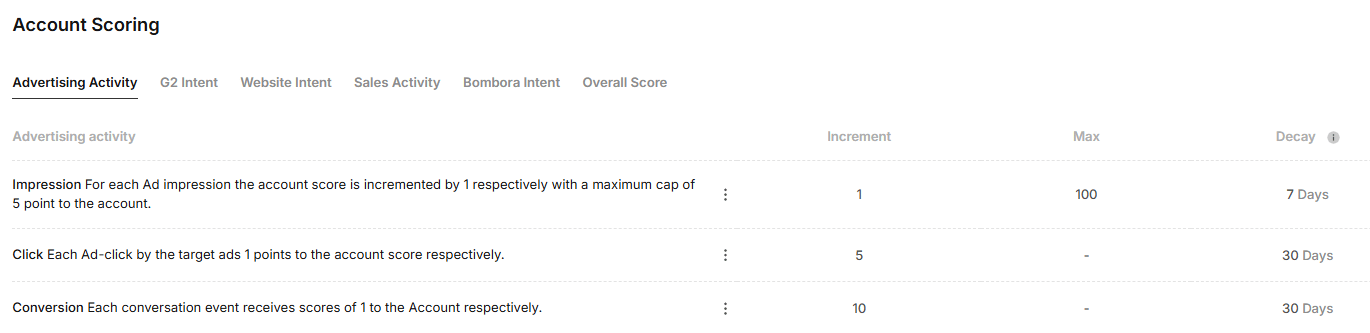
Advertising Activity Scoring Breakdown:
Each activity scoring can be edited and customized as per one’s own ABM strategy.
- Click:
- Description: Each ad click by a target account adds 1 point to the account score if no increment value is set.
- Increment: Recotap’s default value is fixed at 5 points per click.
- Maximum Cap: Not applicable.
- Decay: Default value is 30 days.
- Conversion:
- Description: Each conversion event (e.g., form submission or specific engagement) adds 1 point to the account score, if no increment value is set.
- Increment: Each conversion contributes 10 points by default in Recotap.
- Maximum Cap: Not applicable.
- Decay: Default value is 30 days.
- Impression:
- Description: For every ad impression (view), the account score increases by 1 point, if increment value isn’t set.
- Increment: Default value is set at 1 point per impression.
- Maximum Cap: Capped at 5 points per account.
- Decay: Points decay after 7 days by default.
G2 Intent Scoring Breakdown:
Each activity scoring can be edited and customized as per one’s own ABM strategy.
Website Intent Scoring Breakdown:
Each activity scoring can be edited and customized as per one’s own ABM strategy.
- Page-Based Scoring – Different pages can be assigned different scores depending on their importance.
- Decay Mechanism – Intent scores reduce over time if no further engagement happens (e.g., scores decay after 30 days).
- Customization – Users can add rules and define what web pages count as intent signals.
Steps to add a rule:
- Select Web Page Condition: Choose “Contains” or “Equals”.
- Enter URL Keyword: Example: If the URL contains “pricing,” it signals strong intent.
- Assign Score: Increase or decrease score based on importance.
- Set Decay: Define how long the score should remain before it reduces (e.g., 30 days).
Sales Activity Scoring Breakdown:
Each activity scoring can be edited and customized as per one’s own ABM strategy.
Bombora Intent Scoring Breakdown:
Each activity scoring can be edited and customized as per one’s own ABM strategy.
- The Bombora Intent Scoring Model in Recotap assigns scores based on intent signals captured from Bombora. You will see a list of groups/topics that you have set here. You can assign scores against them.
- Users can edit Bombora rules by adding new intent topics or adjusting scores based on relevance.
- Scores will be calculated based on the number of Bombora Intent Topics that the accounts match
How to Edit the Account Scoring Model?
- Click the three-dot menu (⋮) against each activity to edit the scores.
- Adjust the values for Increment, Maximum Level, Scores or Decay as per your scoring needs.
- Use the toggles to enable or disable limits (e.g., Maximum Level or Decay).
- Click Update to save changes.
Determine Account Engagement aligning to the scores:
Engagement scores can be categorized into three levels based on their percentiles:- Hot: Accounts in the top 80th to 100th percentiles (highest engagement).
- Warm: Accounts in the 60th to 80th percentiles.
- Cold: Accounts in the bottom 0th to 60th percentiles.
Formula for Calculating PercentilesThe percentile for a score can be calculated using the following formula: ` P=(S−Min / Max−Min)×100 Where:
- P = Percentile
- S= The individual score
- Min = Minimum score in the range
- Max = Maximum score in the range