

Dynamic Audience Segments
Dynamic segments in Recotap are rule-based audiences that automatically update as new accounts meet or fall out of the criteria you define.
How Dynamic Segments Work
When you create a Dynamic Segment, you’re essentially telling Recotap to watch for accounts that meet a combination of filters. These filters can be based on account attributes, intent signals, website behavior, or campaign activity. Once an account qualifies based on the conditions set, it is automatically included in the segment. Similarly, if an account no longer meets the criteria, it will be removed—making your segment self-refreshing.Filter Categories Available
You can define a dynamic segment by setting one or more of the following filter types:
Advanced Logic with Filter Groups
To create more complex segmentation logic, Recotap allows:
-
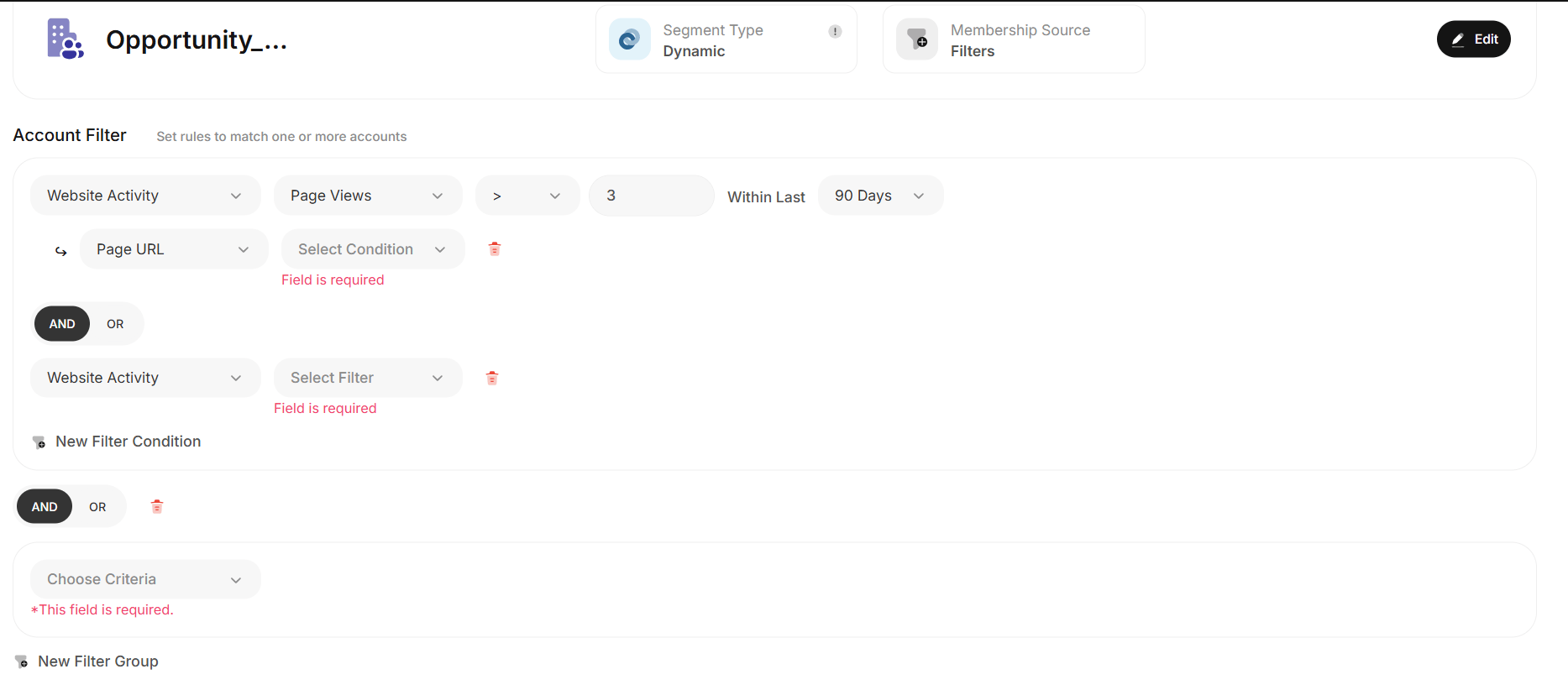
Filter Within a Group
Apply multiple conditions that refine a specific behavior or activity.
Example: Accounts with
- Ad Impressions > 5 AND
- Clicks > 1 (Within the same group)
-
New Filter Group
Create entirely separate logic blocks combined with AND/OR logic.
Example:
- Group 1: Recotap Ad Activity → Ad Impressions > 5
- Group 2: Website Activity → Visited “Pricing Page” in last 7 days (Result: Only accounts matching both groups will qualify.)
✅ Best Practices for Creating Dynamic Audience Segments
- Start with a Clear Goal Define the purpose of the segment—awareness, retargeting, sales engagement, or nurturing. This ensures filters align with campaign objectives.
- Use Multi-Signal Criteria Combine signals like intent, engagement, and fit for better accuracy. Example: G2 Score > 60 + Ad Impressions > 5 + Journey Stage = Consideration
- Avoid Over-Segmenting Using too many filters can make your audience too narrow. Stick to 3–5 high-impact filters.
- Use Filter Groups Smartly Create grouped logic (e.g., “Website Activity” + “Ad Clicks”) to make conditions clearer and maintainable.
- Apply Time-Bound Logic Add recency to your filters. Example: “Website visit in the last 10 days” is more useful than “Visited product page (anytime)”.
- Regularly Audit Segments Review segment size, performance, and engagement every 2–4 weeks. Tweak filters to keep them relevant.
- Exclude Irrelevant Accounts Add negative filters to remove closed-lost deals, existing customers, or bounced contacts.
-
Label Your Segments Clearly
Use naming conventions like:
TOFU_G2+Ads_Last7DaysorExpansion_Customer_US_Healthcare
How Dynamic Audience Segments Help Solve ABM Marketing Challenges
As a marketer running ABM programs, targeting the right accounts at the right time with relevant messaging is always the goal—but also the challenge. Here’s how dynamic segments directly help solve key pain points: 🔄 1. Challenge: Static Lists Go Outdated Fast Solution: Dynamic segments auto-refresh as account behaviors change—so you’re never targeting stale or irrelevant accounts. 🧭 2. Challenge: Difficulty in Aligning Messaging to Journey Stages Solution: Create segments based on journey stage filters. Engage accounts with TOFU, MOFU, or BOFU content depending on where they are. ⚙️ 3. Challenge: Manual Segmentation is Time-Consuming Solution: Use Recotap’s filter logic (AND/OR, groups) to automate segmentation using behavior, intent, and CRM signals. 🧊 4. Challenge: Cold Outreach to Low-Intent Accounts Solution: Dynamically build high-intent segments using G2, Bombora, or sales engagement filters—ensuring sales focuses only on warm/hot accounts. 📉 5. Challenge: Ad Spend Wastage on Unengaged Accounts Solution: Filter based on Recotap ad engagement (e.g., impressions + clicks > threshold) to only include active accounts in ad campaigns.Real-Life Example Using Dynamic Segments in Recotap
- Ad Clicks ≥ 1 (Last 7 days) AND
- Visited Pricing Page (Last 10 days) OR
- G2 Topic = “AI Software” with Score > 60 OR
- Journey Stage = Consideration/Decision | Focus only on hot accounts with fit + engagement + intent signals; improve demo conversion and reduce wasted ad spend | | 2. Retarget Mid-Funnel Drop-Offs | Re-engage accounts that visited product/pricing pages but didn’t convert | - Visited Product Page (Last 14 days) OR
- Visited Pricing Page (Last 14 days) OR
- G2 Score > 40 AND
- Ad Clicks < 1 (Last 7 days) OR
- CRM Deal Stage = Open/Evaluating | Nurture accounts with high website activity but low ad engagement; ideal for retargeting via LinkedIn or sales email | | 3. Customer Expansion | Target new departments or regions within existing customer accounts | - CRM Account Status = Customer AND
- Department = IT or Ops - Last Contacted > 30 days ago OR
- Visited Use Case/Blog Pages AND
- Bombora Topic = “Workflow Automation” Score > 50 | Expand within current accounts by targeting new stakeholders; helps boost upsell/cross-sell and account penetration |